Two clients with large Zapier and Make estates, a European entrepreneur-support brand and a US marketing agency with 30+ lead generation clients, needed a way to catch failing automations before they rippled through their operations. Cosmo Californie Media audited every scenario to cut wasted steps, standardised naming and step order, and built a running error log with real-time alerts. The agency cut its automation build time during client onboarding by 61%, and the coaching brand now has ads running within two days of releasing a new course.
- Clients
- A European entrepreneur-support brand and a US digital marketing agency (not named)
- Industry
- Online education and coaching; marketing agency with 30+ lead-gen clients
- Services
- Automation audit, scenario standardisation, error logging and alerts
- Period
- 1 month
- Tools
- Zapier, Make, Google Sheets
Challenges / Opportunities
This case study takes into account two different clients in different markets and industries, but who both leverage automations for their business.
The first company is a well known entrepreneur support brand in europe. Via online courses, group, and 1-1 consulting, they help 1000s of individuals each year launch companies successfully.
The second company is a digital marketing agency in the United States with 30+ lead generation clients. They support their clients with both advertising and sales management and support.
While both of these groups understand the power of automation to their bottom line (Automations reduce overhead expenses by 81% - Forbes 2023) both had reached a point where they had so many automations, they required a system to be able to react quickly when one failed or had a minor bug so that it would not create a negative ripple affect for their business operations.
Work We Did / Lessons Learned
In both instances, we were able to audit their existing automation scenarios and zaps and identify inefficiencies in the automation themselves. Zapier and Make (two popular automation products) charge based on usage, and the less steps that are used in your automation the more money as a business owner you are able to put in your pocket rather than theirs.
Secondly, we created a nimble and simple build out process for new automation scenario creation in the future. For the marketing agency, they were consistently building the same zaps for each client they brought on, but when comparing one scenario that was made for Client 1 with what was supposed to be the same scenario for Client 2, the scenarios were built much different to get to the same outcome. In addition the name of the Zaps and their internal steps didn’t have consistent naming convention, further complicating the ability to troubleshoot when needed. They looked something like this:
Agency Client 1
Zap 1 - Name 123
Trigger, Step 1, Step 2, Step 3, Step 4, Step 5
Agency Client 2
Zap 1 - Name SRK356
Trigger, Step 3, Step1, Step2, Step 5, Step 4, Step 6
We streamlined the build out to:
Client 1
Zap 1 - Name 123 Client Shorthand (C1)
Trigger, Step 1, Step 2, Step 3, Step 4
Client 2
Zap 1 - Name 123 C2
Trigger, Step 1, Step 2, Step 3, Step 4
Lastly, for both clients, we created a running error log that could be managed by their internal team or a hired third party (for one of the cases we currently manage their automation error logs). We leveraged the automation tools themselves to make this possible.
Results & Lasting Benefits
Both clients have a simple error log worksheet that populates a new row whenever one of the automation scenarios has an error. Included is a column where notes can be put and whether the error can be ignored or was adjusted and how. In the cases where the error log is ok to ignore, they are tallied in a separate analysis tab so the client can see which type of zap/make scenario errors the most, providing insights for efficiency improvements for that scenario.
In addition a notification is sent to the appropriate team at the moment of the error so that the problem can be resolved quickly. With consistency in naming convention and steps across scenarios, it is easy for a team member to resolve any issue without being the creator of the automation, unlike previously.
For the marketing agency, they reduced their automation build out time by 61% during new client onboardings after our system was put in place, ultimately creating a less stressful process for their internal team while also translating to a smooth experience for their new customers.
For the coaching brand, they are able to release new courses and within two days have advertisements running with no worry of leads falling out of their high touchpoint and multi segmented funnel due to automation blind spots. Long gone are the days of spending weeks to get the automations setup to support their new campaigns.
Both of these advanced projects were rewarding to work on. Most of our work involves creating one or two unique automations for a client, but these two larger projects allowed us to flex our automation muscles and create a streamlined system with a large positive impact. If you are looking for support or guidance on how to integrate automation capabilities (big or small) into your business don’t hesitate to book a call with us today!
Questions about this case study
What does automation scenario maintenance involve?
Three things in this engagement. An audit of every existing Zap and Make scenario to remove unnecessary steps, which matters because both tools charge by usage. A standard build-out process with consistent names and step order, so the same scenario looks the same for every client. And a running error log, built with the automation tools themselves, that adds a row for every error and notifies the right team at the moment it happens.
Why does naming convention matter for automations?
Before the clean-up, the agency was building what should have been the same Zap differently for each client, with different names and the steps in a different order. Anyone troubleshooting had to work out each one from scratch. With the same name pattern and the same step order across scenarios, a team member can resolve an issue without being the person who built it.
What were the measured results?
The marketing agency reduced its automation build-out time by 61% during new client onboardings. The coaching brand can release a new course and have advertisements running within two days, with no leads falling out of its multi-segmented funnel because of automation blind spots. Both clients have an error log worksheet with a notes column and a tally of which scenario errors most often.
Does Cosmo Californie manage the error logs afterwards?
For one of the two clients we currently manage the automation error logs. For the other, the log is run by their internal team. The log was designed so that either an internal team or a hired third party can work it.
Working with us.
Let's figure out where your growth is getting stuck.
Book a discovery call with Sonny — a focused conversation about your business and where the opportunities are.
Book a Discovery CallMore case studies

Unseen Costs When Not Using a Google Ads Professional
After a clinic moved Google Ads in-house, cost per lead rose 125% and $5,600 in revenue was lost against $1,500 saved in fees.
Webinar Drops + Evergreen Automation Infrastructure
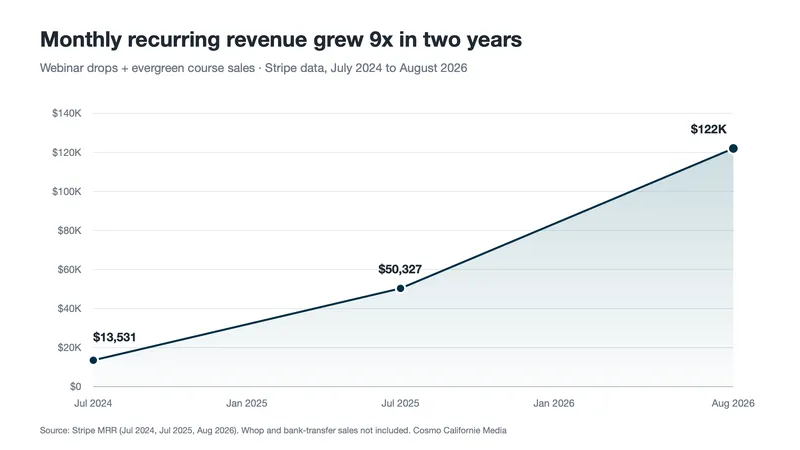
MRR grew from $13,531 in July 2024 to $122K in August 2026 for an online education business running quarterly webinar launches on nearly 30 tools.

Sales System for Startup
MRR grew 2.7x to $67,250 after three years of flat revenue, from a $10,900 total investment in a CRM-driven sales system.